Microsoft has recently announced a new feature of Windows Azure called RemoteApp that allows Windows applications to be hosted on Azure and then run via RDP on the desktop as well as mobile devices, including iOS and Android devices. We're going to look to see how well that works for a PowerBuilder application.
Wednesday, September 10, 2014
Friday, July 18, 2014
Creating a REST web service using PowerBuilder.Net 12.5
One of the new features introduced with PowerBuilder.Net 12.5 was the ability to create WCF web services. The version of the product also introduced a client for REST web services as well, and a WCF client had been introduce in an earlier version. One frequent question I heard when presenting the new features in conference or online sessions was when PowerBuilder.Net would provide the capability to create REST services, not just consume them.
Perhaps what few people realized (including myself at the time) is that WCF web services isn't just for creating SOAP services. Since .Net 3.0, they have been capable of creating REST services as well. So we've actually have had the capability to create REST web services with PowerBuilder.Net since 12.5 was released. In this blog post we'll look at how we do that.
Calling .Net Assemblies from PowerBuilder Classic Win32 via PowerShell
Recently someone asked me how they could get the output from PBDOM used from a PowerBuilder Classic Win32 application formatted with white space as PBDOM doesn't include it. I gave them a number of options, particularlyMSXML through OLE Automation or using a .Net class like XmlTextWriter. Normally if you were going to try to access a .Net assembly from a PowerBuilder Classic Win32 application, you would do it via a COM Callable Wrapper. However, for something this simple I thought there had to be a more lightweight way to accomplish it. One particular lighterweight way that occurred to be would be to have the application launch a Windows PowerShell script that would then use the .Net class in question. We're going to look at an example of how that's done.
Thursday, May 15, 2014
Swiss PowerBuilder User Group Meeting - May 5, 2014
The meeting was held as SAP's offices in Regensdorf, a suburb of Zurich.
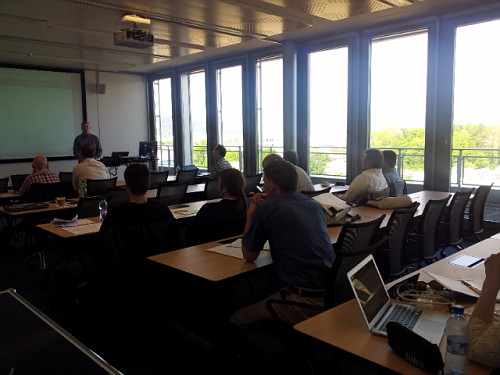
The meeting started with Sue Dunnell and Dave Fish discussing the status of PowerBuilder, and in particular the beta.
- 235 people signed up for beta. Small for PB, but big for SAP
- Other products are looking to follow same process, also complaining about S-user requirement
After that, Dave Fish demonstrated the following features in the beta version of PowerBuilder 15
- OData
- 64 bit support (Native)
- Dockable Windows
- HTML5 DataWindow
That was followed by my presentation on using visual controls (PB.Net in VS.Net, VS.Net in PB Classic). We then broke for lunch. After lunch, Jan Lemmens of SAP then gave an overview of application development with HANA. After that, Dave Fish presenting SAPUI5 and OpenUI5. Finally, Dave Fish demonstrated Android support in Appeon.
Thursday, May 01, 2014
Communication with a smart card from PowerBuilder
We're going to look at using the Smart Card SDK provided in more recent versions of Windows (XP and later). Earlier versions of Windows had an ActiveX installed called CAPICOM which could be accessed from PowerBuilder through OLE Automation, but that control was removed as of Windows Vista because of security issues.
We're going to look at a number of operations:
- Communication with the card
- Validating the user's PIN
- Reading the certificate Subject Name
- Reading other certificate data
A collection of PowerBuilder resources
- All of my PowerBuilder samples, including the source code for the demos I've done at various conferences are available in the PowerBuilder Samples folder on my Google Drive: http://goo.gl/VXouQ
- The PowerBuilder Developer's Journal may have gone away, but I'm going a free "magazine" on FlipBoard. It's basically just collection of articles from all over the internet on PowerBuilder: http://goo.gl/Mrd3Ql
- I've done a number of videos for the SAP Database and Technology Academy. The PowerBuilder related videos, including mine, are available at: http://goo.gl/53pe7a
- I've done a number of webinars for PowerBuilder.TV. The archives of the webinars related to PowerBuilder, including mine, are available at: http://goo.gl/IUHN1N
- Also, don't forget the PowerBuilder Developer Center, where a bunch of us hang out to answer questions, write blogs and documents: http://goo.gl/DtaS58
- You might also want to check out the PowerBuilder Central site. It's an attempt to collect references to different resources like this and make the available in a central location: http://goo.gl/WVyNo7
- If you're looking for PowerBuilder training, be sure to check out Yakov Werde's training offerings (as well as his consulting services) at: elearnitonline.com
Monday, April 21, 2014
ISUG Tech Conference 2014 Report
Monday
Location
It's good not to be in Las Vegas. The location in Atlanta is rather convenient. You can take a MARTA train straight from the airport to a shopping mall close to the hotel and then take a covered walkway from the mall to the hotel. The one issue though is that things are not well marked. It seems that the people responsible for signage may be looking at it from the perspective of people that already know the area. I found it quite hard to find my way around when I first arrived.
Subscribe to:
Posts (Atom)